
Disney park assistant: at the park, your phone watches the waits and plans the day
A free web tool for the six Disney parks in Orlando and California. From your plan and the live waits, it tells you where to go next and how to get there. It opens in your phone's browser: nothing to download. GoParkDay is independent and not affiliated with Disney.
The previews on this page are examples, not live data.
The Now card: where to go now, in one line
One card at the top shows the next stop: where, how far a walk, how long the wait. Its big button is the likeliest next step, like show the way, in line or done; the rest is under ⋯. Prefer one line instead? More › Use the classic view.
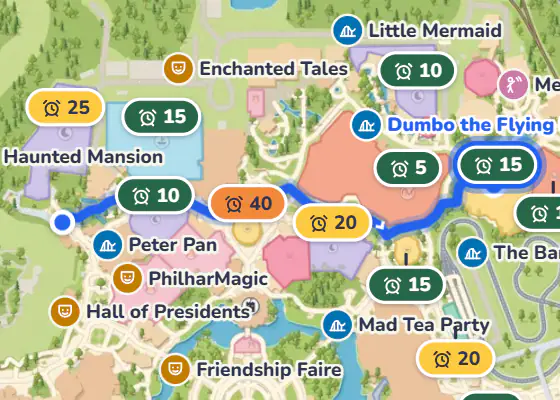
Live map: the walking route, wait bubbles and the nearest restroom
The map draws the walk to your next stop and shows the waits over the rides. The restrooms list puts the nearest first, with baby care, first aid and water too. Without your location it lists them by area and does not guess.
A plan that re-plans itself
Your day is planned around the rides you want, your kids' heights and lunch. When waits change, the rest of the day is re-planned and each change says why. Dining reservations and Lightning Lane times you enter stay fixed. Entering one only records it; it does not book a table.
The guide's questions
Not a chatbot. When it matters, it asks one question, like "this line is long, the one next door is short: go there first?", and you answer with a tap. The plan follows. You cannot type questions yet.
On-time reminders
Lightning Lane, dining, shows, lunch, rain and closing: it tells you when to leave. Turn on notifications to get them on a locked phone; on an iPhone, add the page to your Home Screen first.
Two phones in sync: one holds the line
Two adults signed in to one account share one plan on two phones; a change on one shows on the other soon. In line together, tap "I'll take the kids (the other keeps the place in line)": the line is kept and the card points to the nearest restroom.
How to start
- Sign in, or create a free GoParkDay account.
- Pick your park day: a saved trip opens that day's park; otherwise pick the park and say who is going and what you want to ride.
- Open it on the day in your phone's browser. The evening before, it shows tomorrow's plan.
Open the park assistantSign in →
Just want today's waits? The live pages need no account:
Your location stays on your phone
Location is optional. It is used on your phone to work out the route and never sent to us. Only the plan syncs between phones, never a location.
Questions about the park assistant
- Is the park assistant free?
- Yes. It needs a free GoParkDay account to save and sync your day.
- Do I have to book my trip with you to use it?
- No. It works wherever you booked your tickets and hotel.
- Do I need to download an app?
- No. It opens in your phone's browser, and you can add it to your Home Screen.
- Which parks does it cover?
- All six: Magic Kingdom, EPCOT, Disney's Hollywood Studios and Disney's Animal Kingdom at Walt Disney World, and Disneyland Park and Disney California Adventure at the Disneyland Resort.
- How fresh are the wait times?
- Updated every 5 minutes.